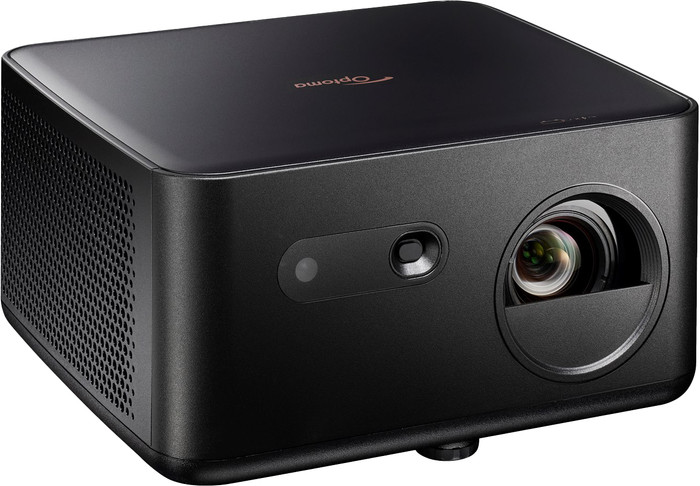
Why the Optoma Photon Life PH31 is interesting for sports nights
The Optoma Photon Life PH31 sits in a useful gap: it is much more serious than the no-name mini projectors that flood marketplaces, but it can still be found in Europe at prices that are realistic for a casual living-room or spare-room setup. If your goal is football, Formula 1, basketball, YouTube, and the occasional movie night on a large wall, the PH31 is appealing because it keeps the spec sheet simple: Full HD resolution, a bright LED light source, very low listed input lag, and standard HDMI for a streaming stick.
This is not the projector to buy if you want true 4K home-theater black levels or a bright daytime replacement for a TV. It is a dark-room projector first. But for buyers who want a clean, low-maintenance budget sports projector in 2026, the PH31 is one of the more convincing options because it avoids two common budget-projector problems: vague brightness claims and painfully slow gaming response.
Quick verdict
The Optoma Photon Life PH31 is worth shortlisting if you can find it near the €350–€400 range and you have a room that can be made dark. It has the right core specs for sports: 1080p detail for jerseys and score graphics, enough measured-style brightness for a moderate screen size, and input lag figures that are unusually strong for this class. Skip it if you need built-in streaming apps, strong onboard sound, wide automatic setup features, or good performance with sunlight in the room.
Key specs that matter
- Resolution: 1920 × 1080 Full HD
- Brightness: 1,500 ISO lumens listed by ProjectorCentral; Coolblue lists 1,500 ANSI lumen
- Light source: LED, listed up to 30,000 hours
- Input lag: 16ms at 1080p/60, 8ms at 1080p/120, and 4.6ms at 1080p/240 according to ProjectorCentral
- Throw ratio: 1.50:1–1.65:1 with 1.1x manual zoom
- Sound: 5W mono speaker
- Noise: 32 dB normal / 26 dB Eco listed
- Typical observed pricing: €349 at Coolblue Germany during this research; ProjectorCentral showed a $699 US street price
Picture quality for football and live sports
For sports, resolution is only half the story. You also need enough brightness to keep the grass, court, ice, and on-screen graphics from looking flat. The PH31’s Full HD panel is the right minimum for a 70- to 100-inch image, especially if you watch compressed streaming feeds where 4K is not always available or not always worth the extra projector cost.
The brightness rating is the biggest reason to consider the PH31 over cheaper Amazon-style mini projectors. Many low-cost projectors advertise huge “LED lumen” numbers that do not translate well to real viewing. By contrast, the PH31 is listed around 1,500 ISO/ANSI lumens by reputable projector and retailer pages. That still does not make it a daylight projector. For the best result, plan on blackout curtains, lights off, and a matte white wall or basic screen. In those conditions, a 70- to 90-inch image is the sweet spot. Pushing to 120 inches can look fun, but sports will lose punch unless the room is very dark.
Why low input lag helps even if you are not gaming
Input lag is usually discussed for gaming, but it also hints at how responsive a projector feels with fast motion and external devices. ProjectorCentral lists the PH31 at 16ms for 1080p/60, which is good enough for casual console gaming and more than fine for navigating a Fire TV Stick, Chromecast, Apple TV, or HDMI laptop feed. If you also want to play FIFA, Rocket League, or Switch games between matches, the PH31 is far safer than random budget projectors that never publish lag numbers.
Do not read the 1080p/240 figure as a reason to buy it for competitive PC gaming; this is still a budget 1080p projector with basic optics and no premium gaming feature set. But the lag numbers are strong for a projector you might realistically buy for a sports-and-movies room.
Setup and placement caveats
The PH31 is not as automatic as lifestyle projectors from XGIMI, Xiaomi, Samsung, or Nebula. Its 1.1x manual zoom and manual focus mean you should measure your throw distance before buying. ProjectorCentral lists a throw ratio of 1.50:1 to 1.65:1, so it needs a bit of distance from the wall compared with short-throw models. For a small bedroom, that can be limiting. For a living room with a shelf or stand behind the couch, it may work well.
Keystone correction can help square the image, but the cleanest picture comes when the projector is physically centered and level with the screen area. If you care about sharp scoreboards and small text, avoid extreme angled placement. This is also a one-HDMI-style setup, so budget for an HDMI switch if you want to connect multiple sources.
Sound: plan on an external speaker
The built-in 5W mono speaker is fine for setup and emergency use, not for a World Cup watch party. Sports broadcasts depend on crowd noise, commentary clarity, and enough volume to overcome fan noise. A basic soundbar, powered bookshelf speakers, or a Bluetooth speaker connected through your streaming device will make a bigger difference than most people expect. If you are already spending for a projector, reserve part of the budget for audio.
Optoma PH31 vs Xiaomi Smart Projector L1 Pro
The Xiaomi Smart Projector L1 Pro is easier to live with if you want a smart-projector experience. Xiaomi lists Android TV, Google Cast, automatic focus, automatic keystone correction, obstacle avoidance, dual 5W speakers, Wi-Fi, Bluetooth 5.0, and a compact 2.0 kg body. It is more convenient and friendlier for casual users.
The tradeoff is brightness. Xiaomi lists the L1 Pro at 400 ANSI lumens, far below the PH31’s 1,500-lumen class. That makes the Xiaomi better as a compact streaming gadget for smaller dark-room images, while the Optoma is the stronger pick for sports on a larger wall. If the room is dark and you mainly care about a big, watchable match, choose brightness and HDMI simplicity over extra smart features.
Who should buy the Optoma Photon Life PH31?
Buy the PH31 if you want a budget projector for sports, movies, and casual gaming; you can control light; you are comfortable using a Fire TV Stick or similar HDMI streamer; and you can place the projector at the correct throw distance. It makes the most sense when discounted near €350–€400. At the $699 price shown on US projector listings, it becomes harder to recommend because stronger 1080p and entry 4K options enter the conversation.
Avoid it if you need a projector for daytime football with open curtains, want built-in Netflix-style apps without external hardware, or need rich sound from the projector itself. Also avoid it if your room is too short for a standard-throw unit.
Final recommendation
The Optoma Photon Life PH31 is a practical budget sports projector when treated as a dark-room, external-streamer setup. Its Full HD image, credible 1,500-lumen brightness class, LED light source, and low listed input lag make it more trustworthy than most bargain projectors. For sports fans buying on a tight budget, it is a smart stretch pick if the local price is closer to €349 than $699.